

The best Vinted seller tools remove a specific repeat job: rebuilding a listing, following up favorites, handling an offer, finding sold stock or preparing shipping labels. VintHelper brings those jobs together instead of making you assemble a separate tab for each. Start with the task you want to finish, then use the workflow that does it.
Choose by the job on your desk
This is a task map, not a list of mysterious growth features. The outcome should be something you can inspect: a saved listing, the intended offer, a located garment or a printable PDF.
| Your job | VintHelper workflow | What to check |
|---|---|---|
| Save listing material | Backups | The photos and fields actually saved |
| Prepare replacement listings | Dressing+ relisting | Selected items, settings and result |
| Follow up favorite notifications | Notifs+ / Auto Mode | The message or price you prepared |
| Handle a buyer's offer | Negotiations | Acceptance limit and separate counteroffer |
| Answer recurring questions | AI Agent | Listing context and your instructions |
| Find the sold item | Private inventory / SKU | Reference and physical location |
| Prepare parcels | Order+ labels | Order, garment and readable label |
| Review the closet | Dashboard | Actual sales and the metric's meaning |
Example one: a favorite becomes a usable offer
A $25 item with a planned 10% reduction gets a $22.50 offer. Notifs+ lets you prepare a manual selection; Auto Mode can follow new favorites with your chosen text and pricing while Vinted and VintHelper remain open.
Keep a separate price for an item that needs it. General discounts, item-specific settings and Professional price tiers should support the margin you intended, not erase it.
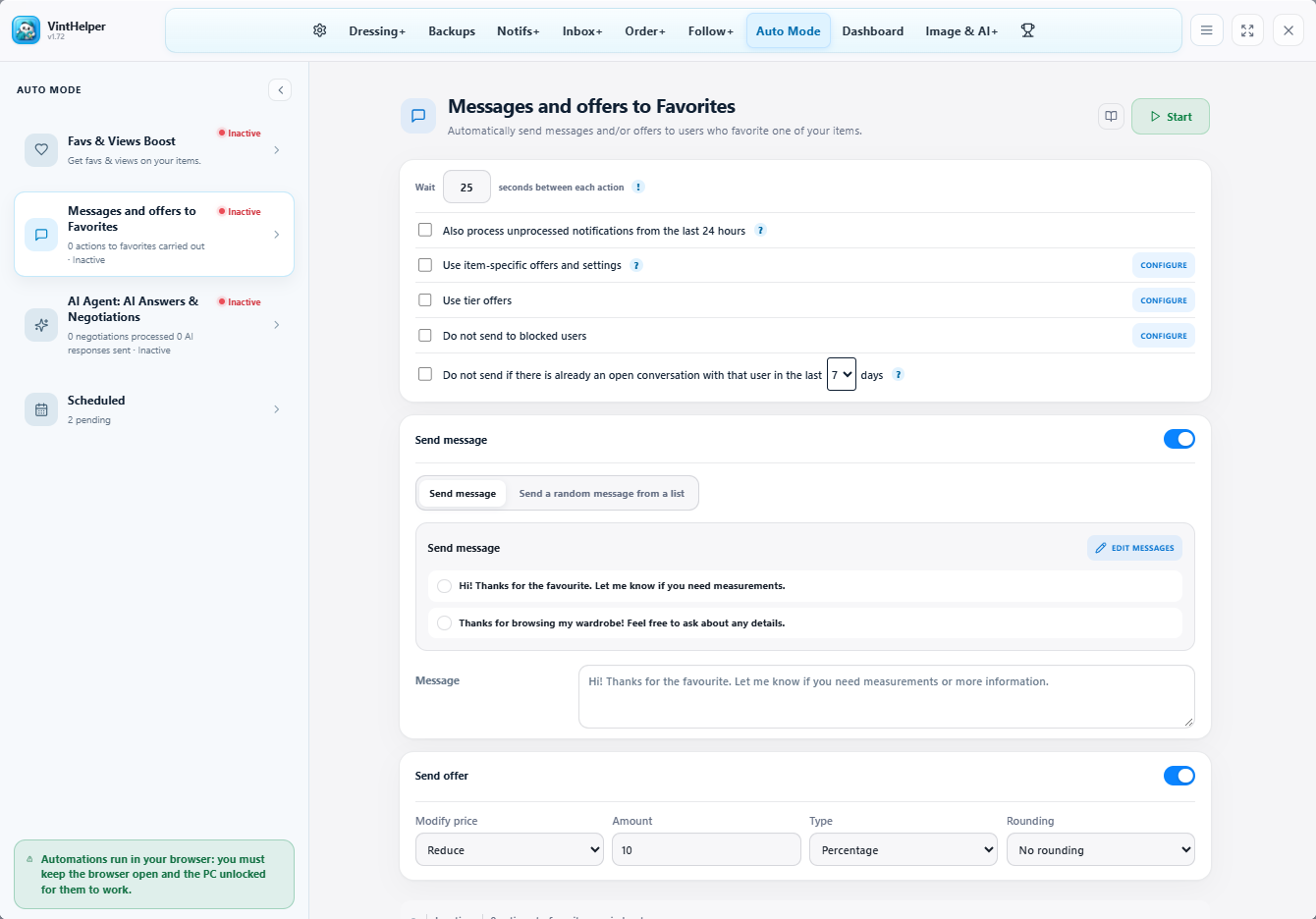
Example two: a buyer negotiates
At a $25 asking price, accepting up to 12% off sets a $22 threshold. A separate 10% counteroffer proposes $22.50. Those are two different rules; incoming negotiations should not borrow the outgoing favorite offer by accident.
AI answers to fit or shipping questions are another function. Give the agent the relevant item context and your real shipping instructions rather than expecting a price percentage to explain your business.
Example three: turn sold items into a label batch
In Order+, select the relevant orders, gather the available labels and choose the printable arrangement. Item information beside the label helps match the garment to its parcel. Professional adds generation options for eligible missing labels; carrier and order support still determine what is available.
Use SKU and location to pull the right item before the paper becomes a packing-table mystery.
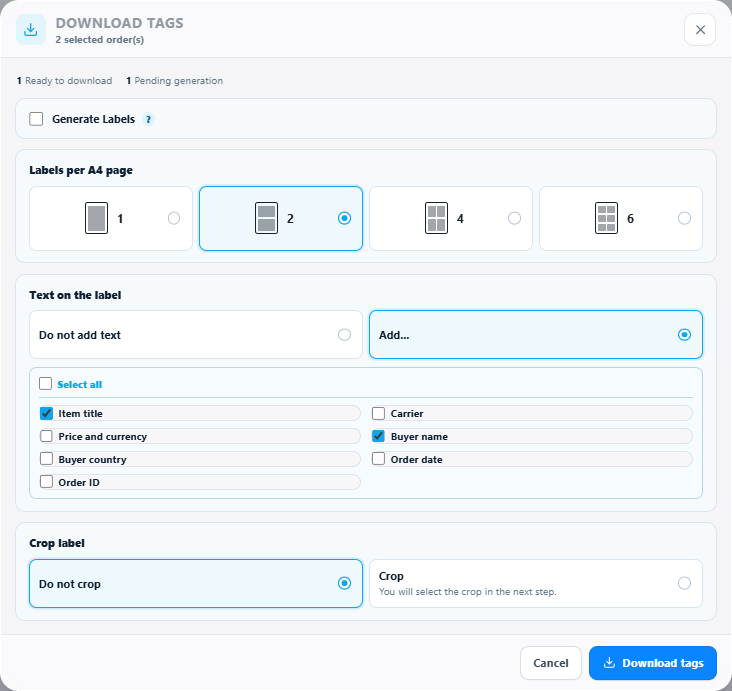
Pick a workflow, not every switch at once
Start with the task costing you time today and inspect the result. You do not need to memorize every module to get value from a relisting panel or an offer queue.
The public documentation has illustrated walkthroughs for each area. Check the current plan details before assuming a feature or quota is included. VintHelper is a Vinted-focused tool, not a cross-listing platform or an official Vinted service.
FAQ
What is the best tool for Vinted sellers?
Look for backups, reposting, favorite messages, offers, photo improvement, order workflows and seller analytics. Those are the jobs that repeat every week.
Is a Vinted bot useful?
Yes, when it handles repeated seller tasks with visible controls instead of pretending to guarantee sales.
Does VintHelper support cross-listing?
No. VintHelper is focused on Vinted seller workflows such as backups, reposting, favorites, offers, Image+, orders and metrics.